
Spegel, Pixie, and Why :latest Is Evil
P2P image caching, eBPF for decrypted traffic, a 30s Kyverno policy, and a "terraform plan" one-liner for K8s.

Welcome to the first issue of Podo Stack. No fluff, no hype — just tools that are actually ripe for prod.
Let’s get into it.
🚀 Sandbox Watch: Spegel
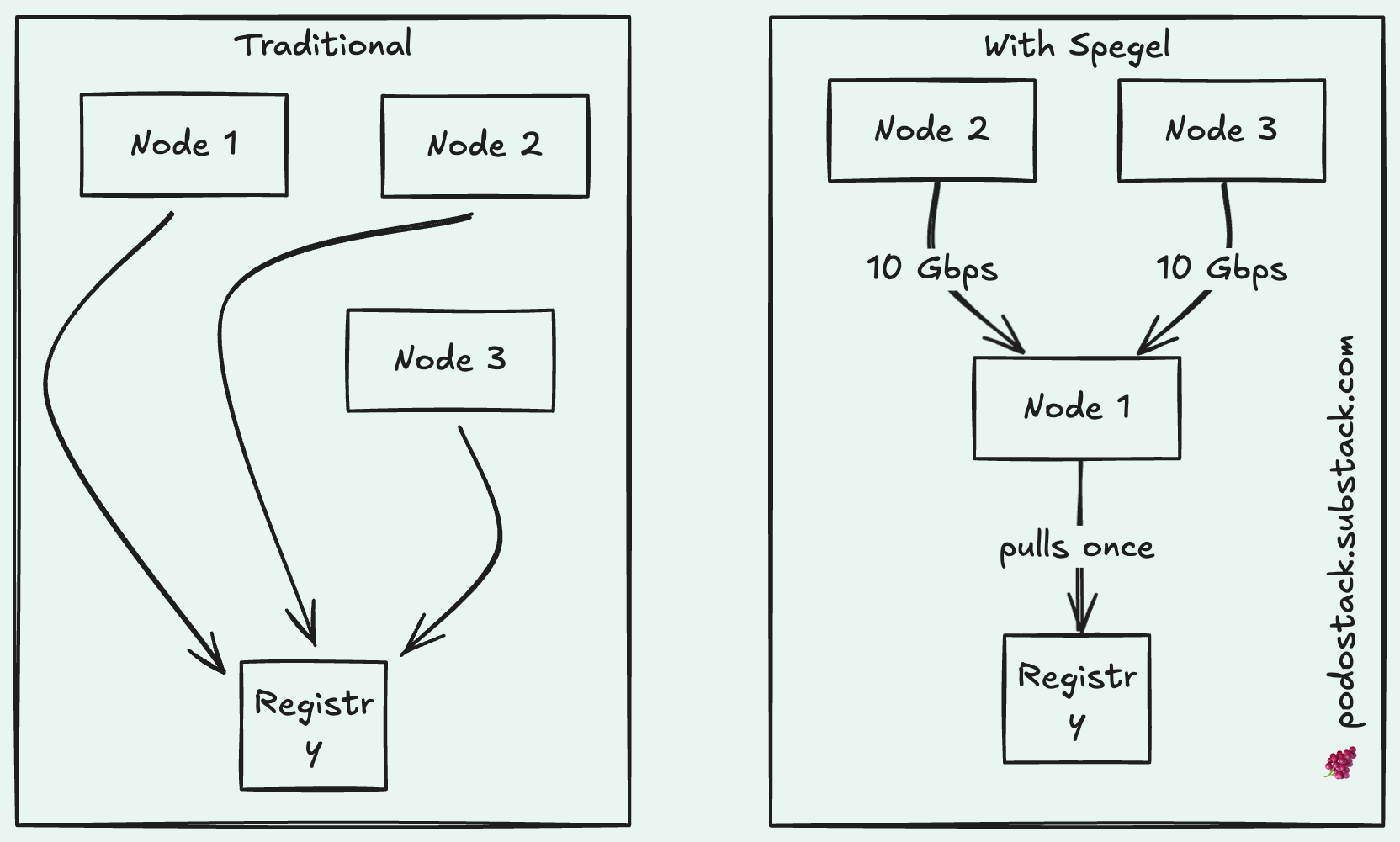
What it is: P2P container image caching for Kubernetes. Nodes share images directly with each other, no registry involved.
Here’s the problem. You’re scaling up your deployment — maybe 50 new pods need to start. Every single node goes to your registry and pulls the same image. At the same time. Your NAT gateway chokes. Docker Hub rate-limits you. Your cloud bill spikes from egress traffic.
Spegel fixes this with a dead-simple idea: what if nodes just shared images they already have?
How it works
Spegel runs as a DaemonSet. When a node pulls an image, Spegel indexes its layers and announces to the cluster: “Hey, I’ve got this one.” When another node needs that image, it asks Spegel first. If someone in the cluster has it — boom, local transfer at 10 Gbps instead of crawling through the internet.
If nobody has it? Falls back to the external registry like normal.
The best part? It’s stateless. No database, no PVC, no separate storage to manage. It piggybacks on containerd’s existing cache. Install and forget.
Why I like it
One Helm chart. That’s the setup.
No changes to your pod specs. Spegel works at the containerd level — it’s transparent to your workloads.
Handles Docker Hub rate limits gracefully (the image only gets pulled once per cluster).
More nodes = more cache = faster pulls. It gets better as you scale.
When to use it
You’re on containerd (most clusters are). You scale workloads frequently. You’re tired of paying egress fees or hitting registry limits. You don’t want to operate Harbor or Dragonfly.
Links
💎 The Hidden Gem: Pixie
What it is: eBPF-powered observability that requires zero code changes. Install it, and two minutes later you have a service map of your entire cluster.
Most observability follows the same painful pattern: add a library, redeploy, wait for data. Pixie skips all of that.
It uses eBPF to intercept data at the kernel level. HTTP requests, SQL queries, DNS lookups — Pixie sees them all. Automatically. Without touching your code.
But here’s the killer feature: it sees decrypted TLS traffic.
If you’ve ever tried to debug mTLS traffic in a service mesh, you know the pain. Wireshark shows garbage. Logs are empty because the developer forgot error handling. You’re blind.
Pixie intercepts data *before* it hits the SSL library. You get the actual request body, in plain text, even when it’s encrypted on the wire.
Real-world use case
Your payment service throws 500 errors. Logs say nothing. Metrics show increased latency but no obvious cause.
Old way: Add logging, rebuild, redeploy, wait for the error to happen again. Hope your logging catches it.
Pixie way: Open the console, run `px/http_data`, filter by status code 500. You see the exact request body and the SQL query that was running when it failed. Time to resolution: 2 minutes.
Other tricks
Continuous profiling without recompiling. Your Go/Rust/Java service is burning CPU? Pixie builds a flamegraph in real time. You’ll see the exact function causing trouble.
PxL scripting. It’s like Python with Pandas, but for your cluster telemetry. Query anything.
Quick start
px deployThat’s it. Seriously.
Links
👮 The Policy: Disallow :latest Tags
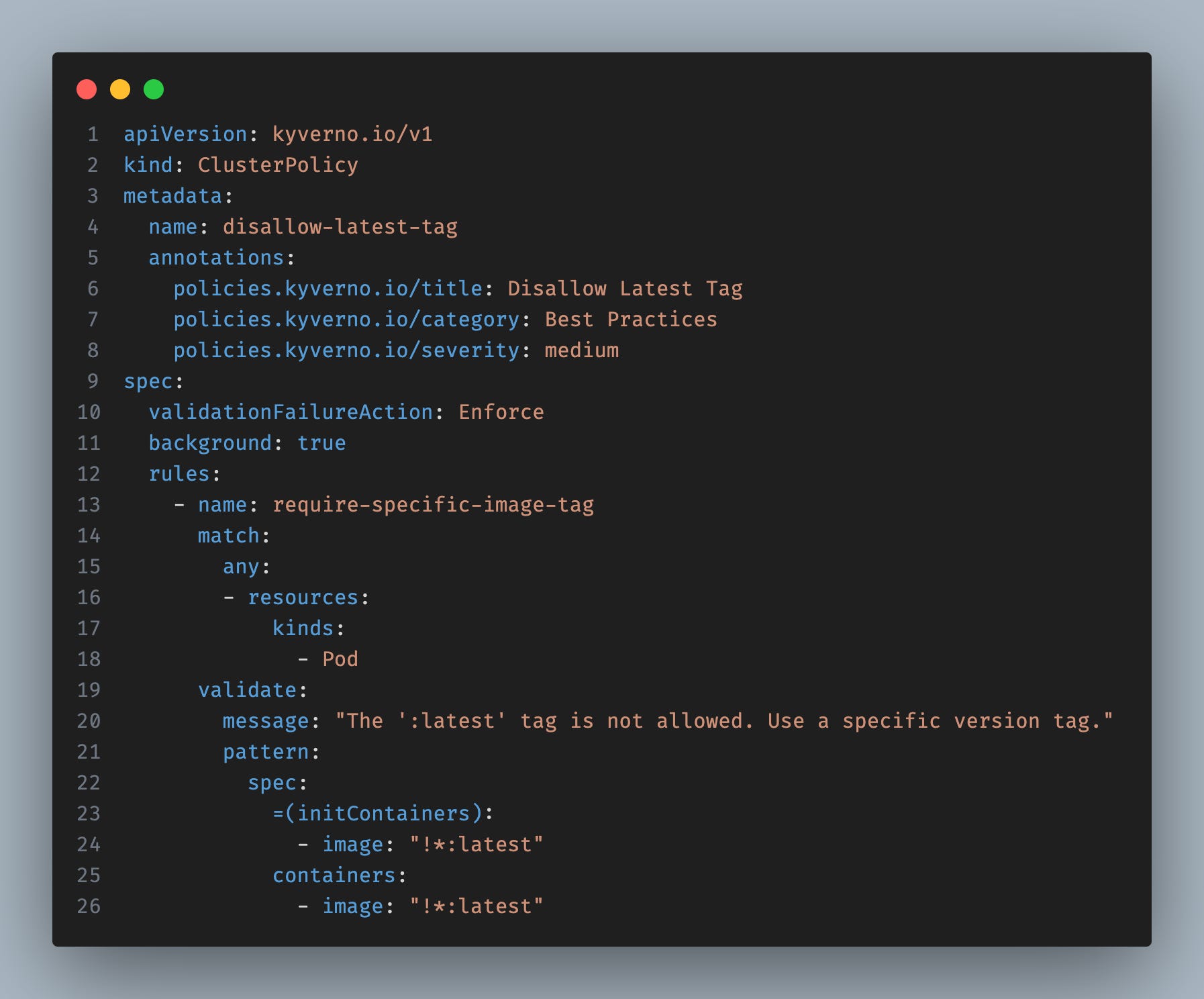
Copy this, apply it, and save yourself from future headaches.
Why this matters
:latest is a lie. It doesn’t mean “latest” — it means “whatever happened to be built last time someone didn’t specify a tag.” The image changes without the tag changing. Your Tuesday deployment works fine. Your Wednesday deployment breaks. Same manifest, different image.
Three nodes in your cluster might have three different versions of nginx:latest cached. You’ll spend hours debugging why “the same pod” behaves differently on different nodes.
The policy
How it works
validationFailureAction: Enforce— blocks pods that violate the rule. Use `Audit` if you just want warnings.image: “!*:latest”— the!means “NOT”. Any image except:latest.Kyverno auto-applies this to Deployments, StatefulSets, Jobs — anything that creates pods.
Test before enforcing
Start with `Audit` mode. Check what would be blocked. Then switch to `Enforce` when you’re confident.
Links
🛠️ The One-Liner: flux diff
flux diff kustomization my-app --path ./clusters/prod/This is “terraform plan” for Kubernetes.
You’re about to merge a PR that changes your deployment. What actually changes in the cluster? With this command, you know before it happens.
Why it’s better than kubectl diff
Understands Flux Kustomization CRDs
Handles SOPS-encrypted secrets (masks values in output)
Filters out noisy fields like `status` that change constantly
Bonus — diff everything
flux diff kustomization --allShows what would change across all kustomizations in your cluster.
Pro tip: Add this to your CI pipeline. Post the diff as a PR comment. Reviewers see the actual Kubernetes changes, not just YAML line diffs.
Links
Questions? Feedback? Reply to this email. I actually read them.